# Regularization Request

To check Regularization Request

Go to Attendance

<figure><img src="https://160083056-files.gitbook.io/~/files/v0/b/gitbook-x-prod.appspot.com/o/spaces%2FmK2RCoJJtarg5gUVoIgX%2Fuploads%2FUhECMIGvDlmHz3FbwUbp%2Fimage.png?alt=media&#x26;token=01c5878f-42f2-40bf-ba98-f8bc0031e8f0" alt=""><figcaption></figcaption></figure>

In attendance, click on the Regularization Request

<figure><img src="https://160083056-files.gitbook.io/~/files/v0/b/gitbook-x-prod.appspot.com/o/spaces%2FmK2RCoJJtarg5gUVoIgX%2Fuploads%2FY5DZmqNDbXlHXoAdiWpT%2Fimage.png?alt=media&#x26;token=acc8911f-a86b-4cdd-b559-a4a31b16dc3f" alt=""><figcaption></figcaption></figure>

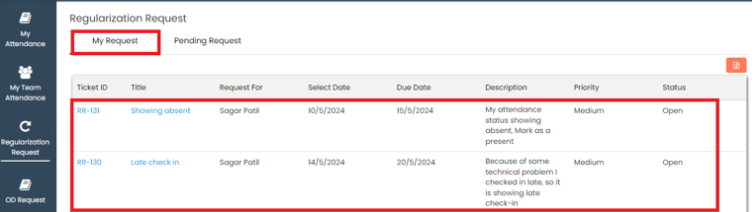
To check own regularization request, click on My Request

In My Request, user can check own regularization request with all the details

<figure><img src="https://160083056-files.gitbook.io/~/files/v0/b/gitbook-x-prod.appspot.com/o/spaces%2FmK2RCoJJtarg5gUVoIgX%2Fuploads%2FBmCMIEEUxrA8SPPbXmBx%2Fimage.png?alt=media&#x26;token=2def4f28-2903-49aa-a6c1-4ff31eff7bc5" alt=""><figcaption></figcaption></figure>

To check team’s regularization request, click on Pending Request

Select employee name, date and, search

In Pending Request user can check team member’s regularization request with all the details

<figure><img src="https://160083056-files.gitbook.io/~/files/v0/b/gitbook-x-prod.appspot.com/o/spaces%2FmK2RCoJJtarg5gUVoIgX%2Fuploads%2F0vN7T5jer4Hho1elsZ7H%2Fimage.png?alt=media&#x26;token=d9190d7e-8825-4388-b4f8-cdc660e5c48c" alt=""><figcaption></figcaption></figure>

Last updated 26 December 2025