# FAQ and Details

### **Configuring FAQ** <a href="#configuring-faq" id="configuring-faq"></a>

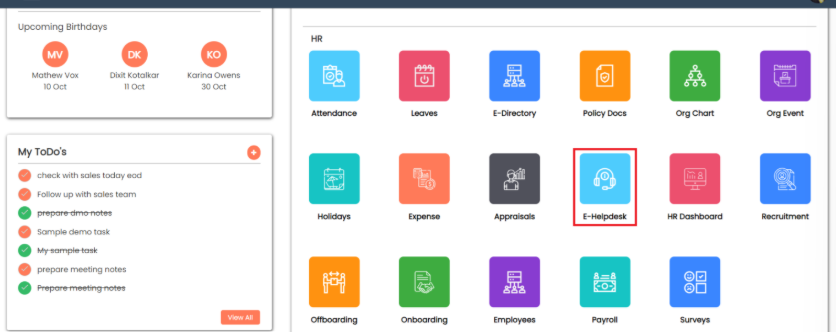
Go to E-Helpdesk.

<figure><img src="https://160083056-files.gitbook.io/~/files/v0/b/gitbook-x-prod.appspot.com/o/spaces%2FmK2RCoJJtarg5gUVoIgX%2Fuploads%2FjbKHzQKRDY7F0rhw4TI2%2Fimage.png?alt=media&#x26;token=fdad3e71-21f0-4f5e-9589-2e4cb9f25cdf" alt=""><figcaption></figcaption></figure>

Click on **Services** to manage service-specific information.

<figure><img src="https://160083056-files.gitbook.io/~/files/v0/b/gitbook-x-prod.appspot.com/o/spaces%2FmK2RCoJJtarg5gUVoIgX%2Fuploads%2F3tdygGxaEaQ6O6mZRNaG%2Fimage.png?alt=media&#x26;token=18db6d7b-6573-4c97-acbe-17f22ef8daaa" alt=""><figcaption></figcaption></figure>

On the service cards displayed, click the **Settings** option (located on each card).

<figure><img src="https://160083056-files.gitbook.io/~/files/v0/b/gitbook-x-prod.appspot.com/o/spaces%2FmK2RCoJJtarg5gUVoIgX%2Fuploads%2FC9OPPV5Yxs7IfxbnSDUP%2Fimage.png?alt=media&#x26;token=5771e307-3d23-4491-b3c5-ebf246d21fbc" alt=""><figcaption></figcaption></figure>

In the settings panel, go to the **FAQ** tab to begin adding FAQs.

<figure><img src="https://160083056-files.gitbook.io/~/files/v0/b/gitbook-x-prod.appspot.com/o/spaces%2FmK2RCoJJtarg5gUVoIgX%2Fuploads%2F26gLyNd4TX0UmnsFkBZN%2Fimage.png?alt=media&#x26;token=28dd60ed-1a07-4f3c-92d5-08768fa03ef9" alt=""><figcaption></figcaption></figure>

Click on **+New Record** to add new FAQ.

<figure><img src="https://160083056-files.gitbook.io/~/files/v0/b/gitbook-x-prod.appspot.com/o/spaces%2FmK2RCoJJtarg5gUVoIgX%2Fuploads%2F0Ic5mWEO0V8mQPwESiSG%2Fimage.png?alt=media&#x26;token=dfcf34e4-2d85-4bbe-a1f2-dde553df2154" alt=""><figcaption></figcaption></figure>

Add question, answer and sequence and **save** it.

<figure><img src="https://160083056-files.gitbook.io/~/files/v0/b/gitbook-x-prod.appspot.com/o/spaces%2FmK2RCoJJtarg5gUVoIgX%2Fuploads%2FPGTcyQjvRmQMxfRpECNM%2Fimage.png?alt=media&#x26;token=5ebf1a0e-3c51-43f6-bc75-7e1cbaf491a9" alt=""><figcaption></figcaption></figure>

If we add a sequence, then the question will be clarified according to that sequence.

Once saved, the FAQ will appear in the grid view.

<figure><img src="https://160083056-files.gitbook.io/~/files/v0/b/gitbook-x-prod.appspot.com/o/spaces%2FmK2RCoJJtarg5gUVoIgX%2Fuploads%2FY5pPM1aA1MXvNLNBVmMq%2Fimage.png?alt=media&#x26;token=221c8f1c-f86a-4112-97d7-8e323f694495" alt=""><figcaption></figcaption></figure>

From there, you can edit or delete the FAQ, as well as view it using the 3-dot action menu.

<figure><img src="https://160083056-files.gitbook.io/~/files/v0/b/gitbook-x-prod.appspot.com/o/spaces%2FmK2RCoJJtarg5gUVoIgX%2Fuploads%2Ff2lRHMPr5kPSh4PAgsMw%2Fimage.png?alt=media&#x26;token=533e78a9-886e-46e5-8c86-d575c25b1d7b" alt=""><figcaption></figcaption></figure>

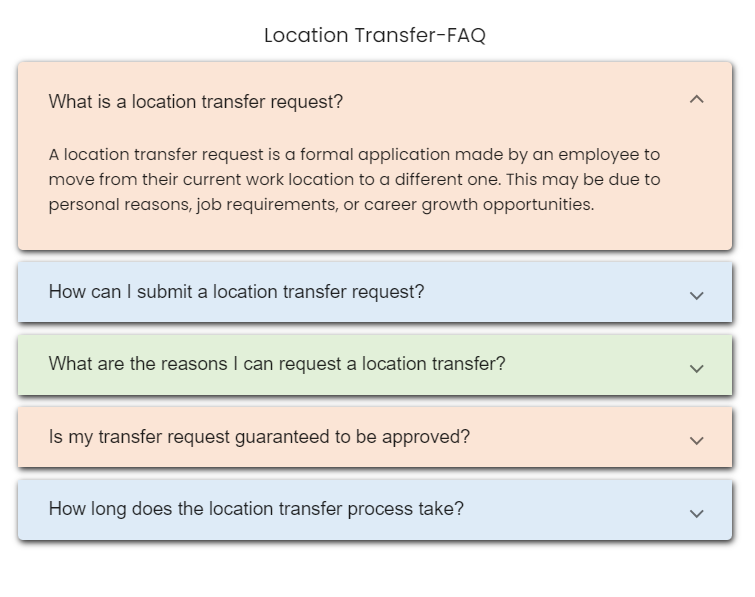
FAQs can be viewed directly on the **Services** card by clicking on **FAQ**.

<figure><img src="https://160083056-files.gitbook.io/~/files/v0/b/gitbook-x-prod.appspot.com/o/spaces%2FmK2RCoJJtarg5gUVoIgX%2Fuploads%2FqyclMFY71gIwWuzdHtnA%2Fimage.png?alt=media&#x26;token=edd81cb0-13cd-49e4-84f5-8cca98451070" alt=""><figcaption></figcaption></figure>

<figure><img src="https://160083056-files.gitbook.io/~/files/v0/b/gitbook-x-prod.appspot.com/o/spaces%2FmK2RCoJJtarg5gUVoIgX%2Fuploads%2Fol0AISbxcw8fi9MXJrLt%2Fimage.png?alt=media&#x26;token=b138eacb-7e6f-4b39-8ec4-8c898aae323d" alt=""><figcaption></figcaption></figure>

### **Configure Service Details**

On the service cards in the **Services** section, click on the **Settings** option (similar to configuring FAQs).

<figure><img src="https://160083056-files.gitbook.io/~/files/v0/b/gitbook-x-prod.appspot.com/o/spaces%2FmK2RCoJJtarg5gUVoIgX%2Fuploads%2FVnFlExpjDzUw0rm8IB8V%2Fimage.png?alt=media&#x26;token=203520a6-a6ba-40d1-b20f-cbc03508169d" alt=""><figcaption></figcaption></figure>

In the settings panel, switch to the **Details** tab.

<figure><img src="https://160083056-files.gitbook.io/~/files/v0/b/gitbook-x-prod.appspot.com/o/spaces%2FmK2RCoJJtarg5gUVoIgX%2Fuploads%2FIcOYw6t1nhayTKBdLhw9%2Fimage.png?alt=media&#x26;token=25a55666-b7c1-41e9-af86-992114824b77" alt=""><figcaption></figcaption></figure>

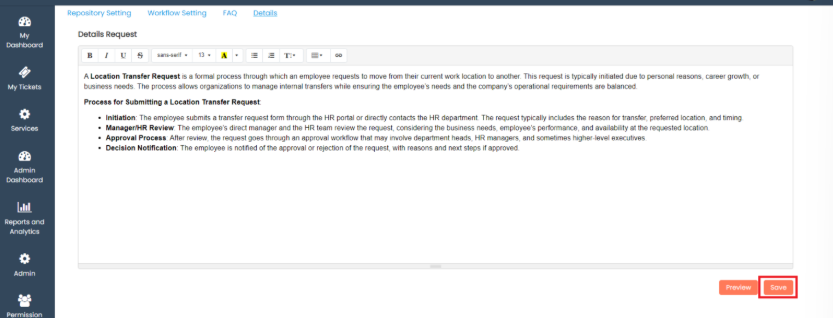
Add the necessary **Request Details** in the provided fields.

Click **Save** to store the information.

<figure><img src="https://160083056-files.gitbook.io/~/files/v0/b/gitbook-x-prod.appspot.com/o/spaces%2FmK2RCoJJtarg5gUVoIgX%2Fuploads%2FOiSFyd8TT3rTzugSzsBy%2Fimage.png?alt=media&#x26;token=ebb791fb-099a-4c98-b971-c3f07c871c24" alt=""><figcaption></figcaption></figure>

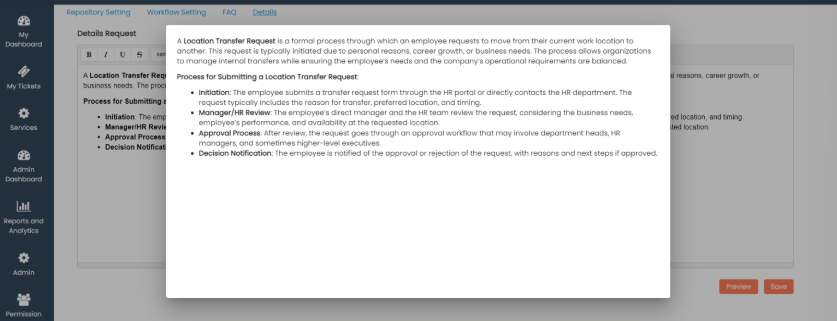
Once saved, you can preview the details by clicking on the **Preview** button to ensure everything is entered correctly.

<figure><img src="https://160083056-files.gitbook.io/~/files/v0/b/gitbook-x-prod.appspot.com/o/spaces%2FmK2RCoJJtarg5gUVoIgX%2Fuploads%2FkuoxIkuNsL04nq5EFfdM%2Fimage.png?alt=media&#x26;token=af5dfc5f-1fac-433e-96a9-f992980a4fa1" alt=""><figcaption></figcaption></figure>

<figure><img src="https://160083056-files.gitbook.io/~/files/v0/b/gitbook-x-prod.appspot.com/o/spaces%2FmK2RCoJJtarg5gUVoIgX%2Fuploads%2FcY0LhISFfCLSZPF2FhSe%2Fimage.png?alt=media&#x26;token=e12ecb59-cb3d-4123-b203-194856d95757" alt=""><figcaption></figcaption></figure>

After adding the service details, users can view them on the **Services** card.

Navigate to the **Services** menu and click on **Details** to view the added information.

<figure><img src="https://160083056-files.gitbook.io/~/files/v0/b/gitbook-x-prod.appspot.com/o/spaces%2FmK2RCoJJtarg5gUVoIgX%2Fuploads%2FBMpIQ374EXh44rS2WFl8%2Fimage.png?alt=media&#x26;token=f427aa51-2498-4b0a-816c-f2d3b61e7a85" alt=""><figcaption></figcaption></figure>

<figure><img src="https://160083056-files.gitbook.io/~/files/v0/b/gitbook-x-prod.appspot.com/o/spaces%2FmK2RCoJJtarg5gUVoIgX%2Fuploads%2FLRN2S75IqKrPIgsxLrZb%2Fimage.png?alt=media&#x26;token=287baa9d-b892-42a9-823d-291522904c08" alt=""><figcaption></figcaption></figure>

**Purpose of Configuring FAQs for Employees**

1. Instant Answers: Provides employees with quick access to solutions for common work-related questions.
2. Improved Efficiency: Helps employees resolve issues faster, improving workflow and reducing downtime.
3. Self-Service: Empowers employees to find information independently without relying on support teams.
4. Reduced Wait Times: Minimizes delays by eliminating the need to contact helpdesk for routine queries.
5. Consistent Information: Ensures all employees receive accurate, standardized responses across the organization.
6. Empowerment: Enables employees to troubleshoot and solve problems on their own, enhancing confidence and productivity.

**Purpose of Service Details**

1. Clear Service Information: Gives users a clear understanding of what a service includes, how it works, and any limits.
2. Request Guidance: Helps users know exactly what steps to follow when making a service request.
3. Transparency: Ensures users know what to expect, building trust and satisfaction.
4. Efficiency: Makes service handling smoother by reducing misunderstandings and unnecessary back-and-forth communication.

Last Updated 17 December 2025