# Offboarding Reason

The "offboarding reason" is the specific cause or rationale behind an employee's departure. It helps the organization and its HR department understand why an employee is leaving

### Add offboarding Reason <a href="#add-offboarding-reason" id="add-offboarding-reason"></a>

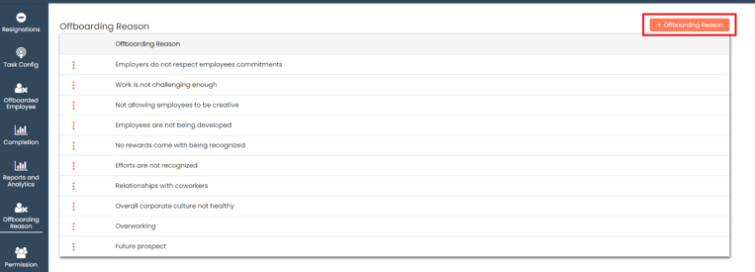
Go to **Offboarding Reason**

<figure><img src="/files/yVCFaMnz0aG3hcsdrAww" alt=""><figcaption></figcaption></figure>

Click on **+Offboarding Reason** button

<figure><img src="/files/jIDVS6xwCC9ZExkZTNFB" alt=""><figcaption></figcaption></figure>

Add **offboarding reason** and click on **save**

<figure><img src="/files/zcDTO5EbgY9LS8mEJEBb" alt=""><figcaption></figcaption></figure>

New offboarding reason added on the top

<figure><img src="/files/WtT9ukwNG4c0vCHiVs9y" alt=""><figcaption></figcaption></figure>

### Edit Offboarding Task <a href="#edit-offboarding-task" id="edit-offboarding-task"></a>

You can choose to edit the offboarding reason that you have created.

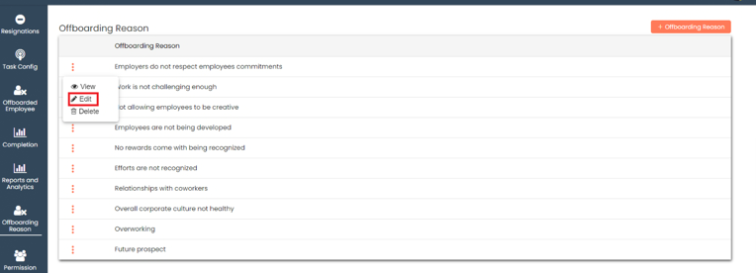
To edit offboarding reason

Click on the Action (3 vertical dots) ![](https://help.quickappflow.com/~gitbook/image?url=https%3A%2F%2F531923687-files.gitbook.io%2F%7E%2Ffiles%2Fv0%2Fb%2Fgitbook-x-prod.appspot.com%2Fo%2Fspaces%252FnhvnNmu6p9CSODwQTjgf%252Fuploads%252F41jVWs5zgPIZdWkz1Rq4%252F4.png%3Falt%3Dmedia\&width=300\&dpr=4\&quality=100\&sign=2e52de7c\&sv=2) for the record which you would like to edit and click the **Edit** button

<figure><img src="/files/ldeVTOmiinEgkIAHH7ER" alt=""><figcaption></figcaption></figure>

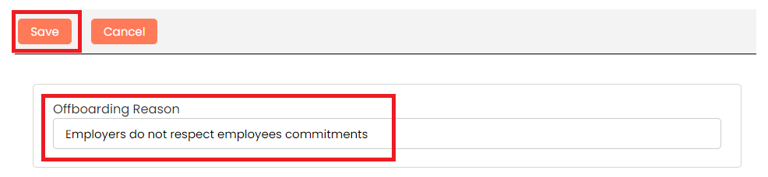
Make the necessary changes and click **Save**

<figure><img src="/files/MmE9nkYdywNYvWM6W0Yf" alt=""><figcaption></figcaption></figure>

### Delete Offboarding Reason <a href="#delete-offboarding-reason" id="delete-offboarding-reason"></a>

Offboarding Reason once added can be deleted if no longer necessary

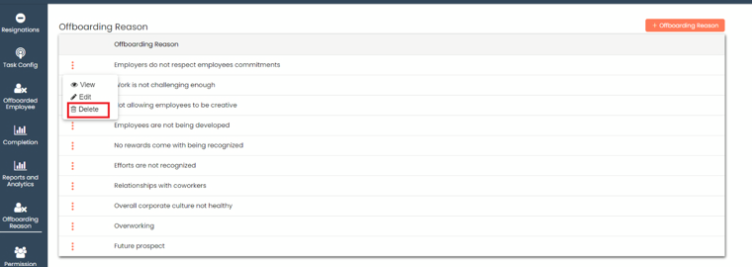
To delete offboarding reason

Click on the Action menu (3 vertical dots) ![](https://help.quickappflow.com/~gitbook/image?url=https%3A%2F%2F531923687-files.gitbook.io%2F%7E%2Ffiles%2Fv0%2Fb%2Fgitbook-x-prod.appspot.com%2Fo%2Fspaces%252FnhvnNmu6p9CSODwQTjgf%252Fuploads%252FlvwchP14y40NuQggLkjt%252F7.png%3Falt%3Dmedia\&width=300\&dpr=4\&quality=100\&sign=d2df8f68\&sv=2) for the record which you would like to delete and click the **Delete** button

<figure><img src="/files/G0v9CwmCbcy5X4PTYXdc" alt=""><figcaption></figcaption></figure>

Give your confirmation in the popup and the record will be deleted

<figure><img src="/files/uK5BSJ43E19Qt1ApcROt" alt=""><figcaption></figcaption></figure>

### View Offboarding Reason <a href="#view-offboarding-reason" id="view-offboarding-reason"></a>

You can choose to view the offboarding reason that you have created.

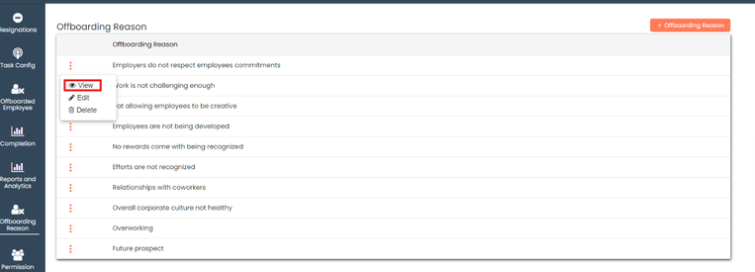
To view offboarding reason

Click on the Action menu (3 vertical dots) ![](https://help.quickappflow.com/~gitbook/image?url=https%3A%2F%2F531923687-files.gitbook.io%2F%7E%2Ffiles%2Fv0%2Fb%2Fgitbook-x-prod.appspot.com%2Fo%2Fspaces%252FnhvnNmu6p9CSODwQTjgf%252Fuploads%252FSPUjZjo0y4bEXTJqguvt%252F10.png%3Falt%3Dmedia\&width=300\&dpr=4\&quality=100\&sign=26958afb\&sv=2) for the record which you would like to view and click the **View** button

<figure><img src="/files/n1O8PbinScoFnednQbjT" alt=""><figcaption></figcaption></figure>

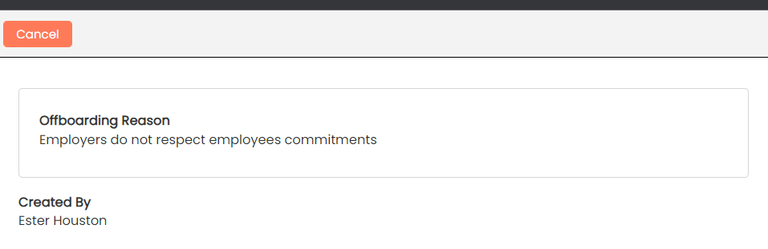
You can see all details of offboarding reason

<figure><img src="/files/nG5J60Uys6k7zcvuElEP" alt=""><figcaption></figcaption></figure>

Last updated 24 December 2025

---

# Agent Instructions: Querying This Documentation

If you need additional information that is not directly available in this page, you can query the documentation dynamically by asking a question.

Perform an HTTP GET request on the current page URL with the `ask` query parameter:

```
GET https://docs.aiflo.app/offboarding/offboarding-reason.md?ask=<question>
```

The question should be specific, self-contained, and written in natural language.
The response will contain a direct answer to the question and relevant excerpts and sources from the documentation.

Use this mechanism when the answer is not explicitly present in the current page, you need clarification or additional context, or you want to retrieve related documentation sections.