# Create and Manage Job

### Create Job Post <a href="#create-job-post" id="create-job-post"></a>

AiFlo allows you to create Job Post in the following ways:

1. Create Job Post individually
2. Import Job Posts

### Create Job Post individually <a href="#create-job-post-individually" id="create-job-post-individually"></a>

To create contacts individually in two ways.

1. From Card View
2. From List View

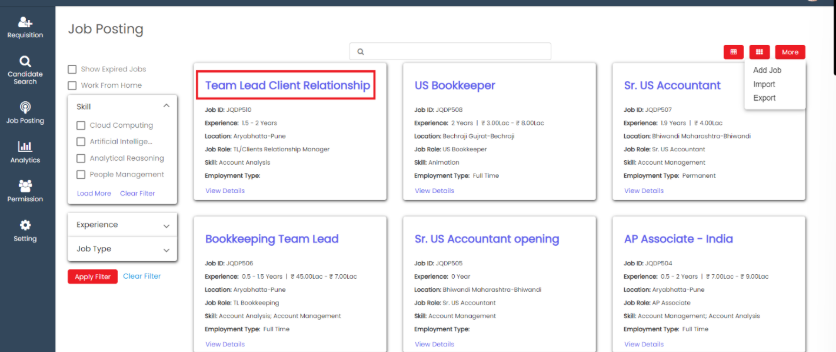
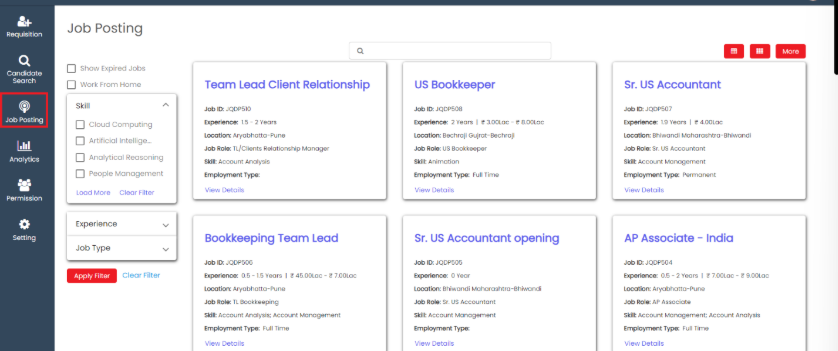
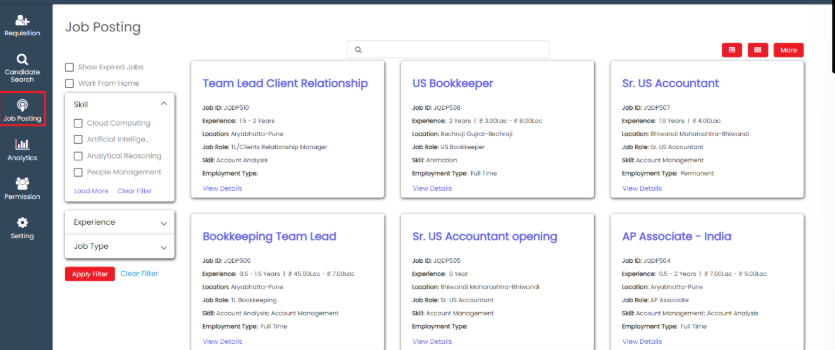
Create Job Post from Card View.

Go to **Job Posting** menu.

<figure><img src="https://160083056-files.gitbook.io/~/files/v0/b/gitbook-x-prod.appspot.com/o/spaces%2FmK2RCoJJtarg5gUVoIgX%2Fuploads%2FDScTpssrDsmWFAS222H7%2Fimage.png?alt=media&#x26;token=4fe669b3-f291-48d4-b3d0-2bb16266f803" alt=""><figcaption></figcaption></figure>

Click on **More** option and click on **Add Job**.

<figure><img src="https://160083056-files.gitbook.io/~/files/v0/b/gitbook-x-prod.appspot.com/o/spaces%2FmK2RCoJJtarg5gUVoIgX%2Fuploads%2F51scqoi0QiKunJU20IWn%2Fimage.png?alt=media&#x26;token=950b261a-2962-4992-b8cc-fd94bbad6531" alt=""><figcaption></figcaption></figure>

Enter the details in the create **Job Post** page and click on **Save**.

<figure><img src="https://160083056-files.gitbook.io/~/files/v0/b/gitbook-x-prod.appspot.com/o/spaces%2FmK2RCoJJtarg5gUVoIgX%2Fuploads%2FygKJzYFPvw3Jd3Ukbk7y%2Fimage.png?alt=media&#x26;token=43b64d58-0673-4606-b0b6-338d8aa08ca3" alt=""><figcaption></figcaption></figure>

The added **Job Post** is shown at the top.

<figure><img src="https://160083056-files.gitbook.io/~/files/v0/b/gitbook-x-prod.appspot.com/o/spaces%2FmK2RCoJJtarg5gUVoIgX%2Fuploads%2FCJ12dZ5omdXhl42VIIrH%2Fimage.png?alt=media&#x26;token=ea79d74a-add2-4f3f-b53d-cc81fc868ac0" alt=""><figcaption></figcaption></figure>

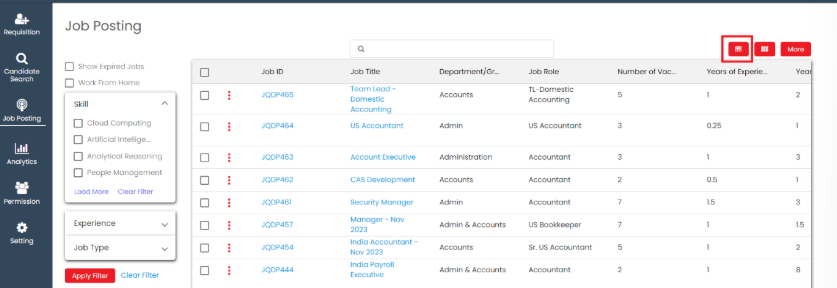
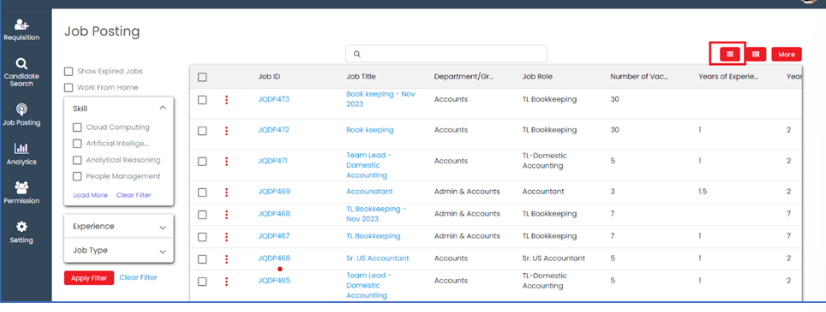
Create Job Post from List View

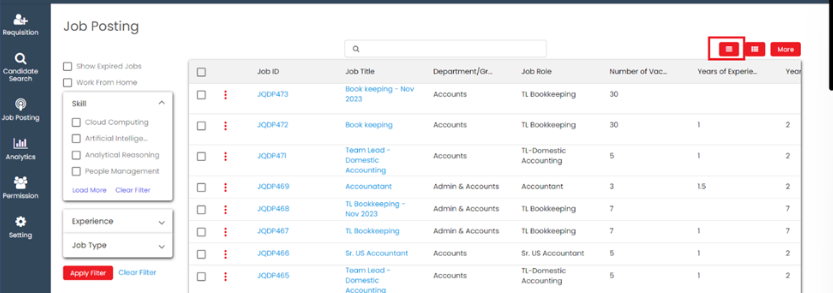
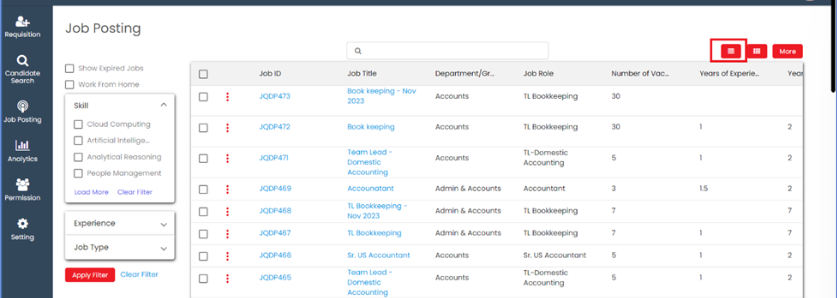
Click on **list view** icon.

<figure><img src="https://160083056-files.gitbook.io/~/files/v0/b/gitbook-x-prod.appspot.com/o/spaces%2FmK2RCoJJtarg5gUVoIgX%2Fuploads%2FFrk9kP0gRBbTHq9oBulX%2Fimage.png?alt=media&#x26;token=ebd2f3ae-bbdd-41a3-af4c-998f506612e3" alt=""><figcaption></figcaption></figure>

Go to **list view** and click on **More**.

<figure><img src="https://160083056-files.gitbook.io/~/files/v0/b/gitbook-x-prod.appspot.com/o/spaces%2FmK2RCoJJtarg5gUVoIgX%2Fuploads%2FIkwCcnWvNAwoaZpgBoxj%2Fimage.png?alt=media&#x26;token=c7bbaa7f-25c0-4475-9b25-20b11638d457" alt=""><figcaption></figcaption></figure>

Click on **Add Job** option.

<figure><img src="https://160083056-files.gitbook.io/~/files/v0/b/gitbook-x-prod.appspot.com/o/spaces%2FmK2RCoJJtarg5gUVoIgX%2Fuploads%2FP4rJvc7EeNRDUHIuqHKC%2Fimage.png?alt=media&#x26;token=7e763ef3-899e-4a68-b55a-c8317cbc512a" alt=""><figcaption></figcaption></figure>

Fill up all the job details.

Select the job template that needs to be assigned to the job post. The fields related to the added job template will be visible in the tracker.

<figure><img src="https://160083056-files.gitbook.io/~/files/v0/b/gitbook-x-prod.appspot.com/o/spaces%2FmK2RCoJJtarg5gUVoIgX%2Fuploads%2FweS43eytlOi11GUj0a3W%2Fimage.png?alt=media&#x26;token=8e32133d-277f-4582-b4e8-bc79a0b8120b" alt=""><figcaption></figcaption></figure>

If recruiter want to assign the job post to any other recruiter, then add the recruiter's name in the 'Assign To' field.

<figure><img src="https://160083056-files.gitbook.io/~/files/v0/b/gitbook-x-prod.appspot.com/o/spaces%2FmK2RCoJJtarg5gUVoIgX%2Fuploads%2FLCtxGlrQ76e0FXfsDd9u%2Fimage.png?alt=media&#x26;token=86247171-1195-4491-b12b-e4e17b333e3f" alt=""><figcaption></figcaption></figure>

If recruiter want to publish on Careers Portal and Fresher opening portal, Select the Publish on Careers Portal and Show Freshers opening checkbox.

<figure><img src="https://160083056-files.gitbook.io/~/files/v0/b/gitbook-x-prod.appspot.com/o/spaces%2FmK2RCoJJtarg5gUVoIgX%2Fuploads%2F4B7VUv6pbajbJfFEg21W%2Fimage.png?alt=media&#x26;token=d30df539-ac22-4dad-8c2d-4f67b9b4d644" alt=""><figcaption></figcaption></figure>

After completing all the details, click on **save**.

<figure><img src="https://160083056-files.gitbook.io/~/files/v0/b/gitbook-x-prod.appspot.com/o/spaces%2FmK2RCoJJtarg5gUVoIgX%2Fuploads%2FAHZXavHpzwvQUFYavfP7%2Fimage.png?alt=media&#x26;token=6e8e9eac-f462-48f3-b3dc-128d4c146783" alt=""><figcaption></figcaption></figure>

### Import records <a href="#import-records" id="import-records"></a>

When a recruiter has a large list of job posts in a spreadsheet and would like to add them to the system, they can import the file, and the job posts will be added.

Go to **Job Post** menu.

<figure><img src="https://160083056-files.gitbook.io/~/files/v0/b/gitbook-x-prod.appspot.com/o/spaces%2FmK2RCoJJtarg5gUVoIgX%2Fuploads%2FuzKiJNvZXUDmzptiX64x%2Fimage.png?alt=media&#x26;token=4ea4f1c5-eea2-46cc-9342-d7efd39ad10d" alt=""><figcaption></figcaption></figure>

Go to **More** option and click on **Import**.

<figure><img src="https://160083056-files.gitbook.io/~/files/v0/b/gitbook-x-prod.appspot.com/o/spaces%2FmK2RCoJJtarg5gUVoIgX%2Fuploads%2F914DyEX1ruRT6HtYiQww%2Fimage.png?alt=media&#x26;token=b00b1489-28fb-423b-bfba-de9c2c7ca619" alt=""><figcaption></figcaption></figure>

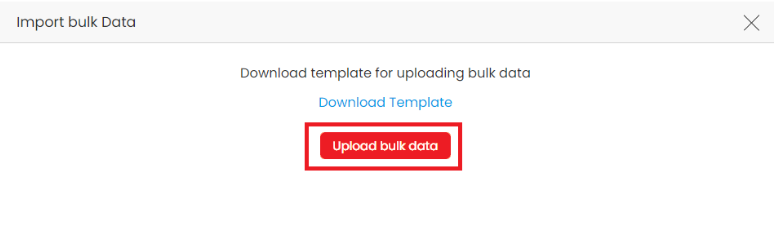
Recruiter can **Download Template** in xlsx format.

<figure><img src="https://160083056-files.gitbook.io/~/files/v0/b/gitbook-x-prod.appspot.com/o/spaces%2FmK2RCoJJtarg5gUVoIgX%2Fuploads%2FIvLfDpqun4uESiB9DKUE%2Fimage.png?alt=media&#x26;token=b85721f4-2087-4941-a9dc-72ea6ebce675" alt=""><figcaption></figcaption></figure>

Make sure you filled up all **required fields** data while importing data.

<figure><img src="https://160083056-files.gitbook.io/~/files/v0/b/gitbook-x-prod.appspot.com/o/spaces%2FmK2RCoJJtarg5gUVoIgX%2Fuploads%2FcQcChzbFxrGpNTrqb3po%2Fimage.avif?alt=media&#x26;token=b66ae4ad-a25c-40c6-b9dc-410acb191f67" alt=""><figcaption></figcaption></figure>

Click on **Upload bulk data** to upload your job posts.

<figure><img src="https://160083056-files.gitbook.io/~/files/v0/b/gitbook-x-prod.appspot.com/o/spaces%2FmK2RCoJJtarg5gUVoIgX%2Fuploads%2FOUHoqFayqnjuFTHdVCPU%2Fimage.png?alt=media&#x26;token=8753b572-ffbe-4241-b140-8364965256d2" alt=""><figcaption></figcaption></figure>

After uploading job post in xlsx file format. Recruiter can see imported job posts in job post list.

<figure><img src="https://160083056-files.gitbook.io/~/files/v0/b/gitbook-x-prod.appspot.com/o/spaces%2FmK2RCoJJtarg5gUVoIgX%2Fuploads%2FQJ0qgjGbA2cU1dvf628q%2Fimage.png?alt=media&#x26;token=9f597b36-2538-4c71-b240-0a22b6d5bfd3" alt=""><figcaption></figcaption></figure>

### Edit Job Post from Details Page <a href="#edit-job-post-from-details-page" id="edit-job-post-from-details-page"></a>

Recruiter can choose to edit the job post that they have created.

To edit job post

Go to **Job Post** menu.

<figure><img src="https://160083056-files.gitbook.io/~/files/v0/b/gitbook-x-prod.appspot.com/o/spaces%2FmK2RCoJJtarg5gUVoIgX%2Fuploads%2F2JYuTKLPCAAlPzmsdHC9%2Fimage.png?alt=media&#x26;token=724e3f26-5f6e-4403-aa75-6ba47848597b" alt=""><figcaption></figcaption></figure>

Click on the job title that the recruiter wants to edit.

<figure><img src="https://160083056-files.gitbook.io/~/files/v0/b/gitbook-x-prod.appspot.com/o/spaces%2FmK2RCoJJtarg5gUVoIgX%2Fuploads%2F9uPdvefUjTG7x0WiCqbA%2Fimage.png?alt=media&#x26;token=eb268726-4d48-4735-9dfc-6aab2a11fbce" alt=""><figcaption></figcaption></figure>

Click on **Edit** icon to edit update job post details.

<figure><img src="https://160083056-files.gitbook.io/~/files/v0/b/gitbook-x-prod.appspot.com/o/spaces%2FmK2RCoJJtarg5gUVoIgX%2Fuploads%2FFrD318NBvZaZazAIRanD%2Fimage.png?alt=media&#x26;token=33219409-c4f1-4f71-ba96-43c327c792c0" alt=""><figcaption></figcaption></figure>

Make the necessary changes and click **Save** button.

<figure><img src="https://160083056-files.gitbook.io/~/files/v0/b/gitbook-x-prod.appspot.com/o/spaces%2FmK2RCoJJtarg5gUVoIgX%2Fuploads%2FCRlbM9qwFnaD4gpt9RMD%2Fimage.png?alt=media&#x26;token=f3031c1e-9c92-4100-90dc-bac2dbdc76e1" alt=""><figcaption></figcaption></figure>

### Edit Job Post from List View <a href="#edit-job-post-from-list-view" id="edit-job-post-from-list-view"></a>

Go to **Job Posting** menu.

<figure><img src="https://160083056-files.gitbook.io/~/files/v0/b/gitbook-x-prod.appspot.com/o/spaces%2FmK2RCoJJtarg5gUVoIgX%2Fuploads%2FxKIMxeqWXthzwoLGhtlF%2Fimage.png?alt=media&#x26;token=5e253d6c-13cc-42cf-8d0d-89f2bf13ee1d" alt=""><figcaption></figcaption></figure>

Click on list view.

<figure><img src="https://160083056-files.gitbook.io/~/files/v0/b/gitbook-x-prod.appspot.com/o/spaces%2FmK2RCoJJtarg5gUVoIgX%2Fuploads%2Fxg17VbUPC8DJ5sTk0Uom%2Fimage.png?alt=media&#x26;token=161d35ae-8ccd-4e86-ae33-66ce68885da1" alt=""><figcaption></figcaption></figure>

Click on actions (3 dot) and select **Edit** option.

<figure><img src="https://160083056-files.gitbook.io/~/files/v0/b/gitbook-x-prod.appspot.com/o/spaces%2FmK2RCoJJtarg5gUVoIgX%2Fuploads%2Fi5hvXRLQ1HfsdZTMWwbO%2Fimage.png?alt=media&#x26;token=a9d12079-8f6d-427c-845b-369045a9b8bc" alt=""><figcaption></figcaption></figure>

Make the necessary changes and click **Save** button.

<figure><img src="https://160083056-files.gitbook.io/~/files/v0/b/gitbook-x-prod.appspot.com/o/spaces%2FmK2RCoJJtarg5gUVoIgX%2Fuploads%2F3Ti5GoBNR65ihUQX4wyP%2Fimage.png?alt=media&#x26;token=6c3ecbba-0dbf-4176-acbe-106aac8d2637" alt=""><figcaption></figcaption></figure>

### Delete Job Post <a href="#delete-job-post" id="delete-job-post"></a>

Job post once added can be deleted if no longer necessary.

To delete job post

Go to **Job Posting** menu.

<figure><img src="https://160083056-files.gitbook.io/~/files/v0/b/gitbook-x-prod.appspot.com/o/spaces%2FmK2RCoJJtarg5gUVoIgX%2Fuploads%2FoYxGN3UGBEkMkuC1PbQi%2Fimage.png?alt=media&#x26;token=285bca55-b48d-494d-b3b2-f4939325acf8" alt=""><figcaption></figcaption></figure>

Go to list view.

<figure><img src="https://160083056-files.gitbook.io/~/files/v0/b/gitbook-x-prod.appspot.com/o/spaces%2FmK2RCoJJtarg5gUVoIgX%2Fuploads%2FfyDa8StAwl7Gv3hqtpVI%2Fimage.png?alt=media&#x26;token=245c3a5a-6943-4b2f-accd-c2dfdc63ed76" alt=""><figcaption></figcaption></figure>

Click on **Delete** icon to delete job post.

<figure><img src="https://160083056-files.gitbook.io/~/files/v0/b/gitbook-x-prod.appspot.com/o/spaces%2FmK2RCoJJtarg5gUVoIgX%2Fuploads%2F53Yho3AMPmdOp7E7AIDr%2Fimage.png?alt=media&#x26;token=fc1e10a5-4794-43a6-9c57-b717ed118eae" alt=""><figcaption></figcaption></figure>

### View Job Post Details <a href="#view-job-post-details" id="view-job-post-details"></a>

Recruiter can choose to view the job details that you have created.

To view Job Post

Go to **Job Posting** menu.

Click on **List View** icon.

<figure><img src="https://160083056-files.gitbook.io/~/files/v0/b/gitbook-x-prod.appspot.com/o/spaces%2FmK2RCoJJtarg5gUVoIgX%2Fuploads%2FiDIhz7Cit3guMiHpTynD%2Fimage.png?alt=media&#x26;token=f7875db2-79c4-4ea6-a39c-f15a2fb2c0d4" alt=""><figcaption></figcaption></figure>

Click on **View** Icon to view job details.

<figure><img src="https://160083056-files.gitbook.io/~/files/v0/b/gitbook-x-prod.appspot.com/o/spaces%2FmK2RCoJJtarg5gUVoIgX%2Fuploads%2FJaegnpVoCWBXaPuzZtuo%2Fimage.png?alt=media&#x26;token=0e27e7c3-df72-4e95-af3d-c3f59bb3caf3" alt=""><figcaption></figcaption></figure>

### Expired Job Post <a href="#expired-job-post" id="expired-job-post"></a>

Recruiter can see the expired job post .

Go to job posting and select show expired jobs filter and apply filter.

<figure><img src="https://160083056-files.gitbook.io/~/files/v0/b/gitbook-x-prod.appspot.com/o/spaces%2FmK2RCoJJtarg5gUVoIgX%2Fuploads%2FE4asjouwghkmavJDw0Tz%2Fimage.png?alt=media&#x26;token=eb437303-34a7-4752-a45e-574bcdfb24eb" alt=""><figcaption></figcaption></figure>

Full control user able to edit expired job post.

Click on edit icon.

<figure><img src="https://160083056-files.gitbook.io/~/files/v0/b/gitbook-x-prod.appspot.com/o/spaces%2FmK2RCoJJtarg5gUVoIgX%2Fuploads%2FYZiDji6I85KaZ1HfxpvV%2Fimage.png?alt=media&#x26;token=06030548-6836-4ab6-b096-6ce7c2d4989e" alt=""><figcaption></figcaption></figure>

Make the necessary changes and click **Save** button.

<figure><img src="https://160083056-files.gitbook.io/~/files/v0/b/gitbook-x-prod.appspot.com/o/spaces%2FmK2RCoJJtarg5gUVoIgX%2Fuploads%2FFrxqY4o9z8scB8F5Ugrz%2Fimage.png?alt=media&#x26;token=85e5f8ac-5c51-4d65-b713-dbf5d85f6fb0" alt=""><figcaption></figcaption></figure>

Full control user only perform export action.

Go to **more** and click on **Export**.

<figure><img src="https://160083056-files.gitbook.io/~/files/v0/b/gitbook-x-prod.appspot.com/o/spaces%2FmK2RCoJJtarg5gUVoIgX%2Fuploads%2F4BZ8C7cItXuDSzptVkjj%2Fimage.png?alt=media&#x26;token=b98905b9-a46a-41a0-a905-cf478e5c6951" alt=""><figcaption></figcaption></figure>

### Replicate Job Post <a href="#replicate-job-post" id="replicate-job-post"></a>

Replicating a job post involves creating a similar job advertisement to attract candidates for a specific position.

Go to **Job Posting** menu.

<figure><img src="https://160083056-files.gitbook.io/~/files/v0/b/gitbook-x-prod.appspot.com/o/spaces%2FmK2RCoJJtarg5gUVoIgX%2Fuploads%2FvkgcyF3fAD9BYACc6RG9%2Fimage.png?alt=media&#x26;token=536c0ac3-45e4-4167-9740-8ca7c253b9c3" alt=""><figcaption></figcaption></figure>

Click on **List View** icon.

<figure><img src="https://160083056-files.gitbook.io/~/files/v0/b/gitbook-x-prod.appspot.com/o/spaces%2FmK2RCoJJtarg5gUVoIgX%2Fuploads%2FWmq5blGmwMaeJm1MMO2g%2Fimage.png?alt=media&#x26;token=f76808f8-9466-4561-8cb8-351d6cf0f642" alt=""><figcaption></figcaption></figure>

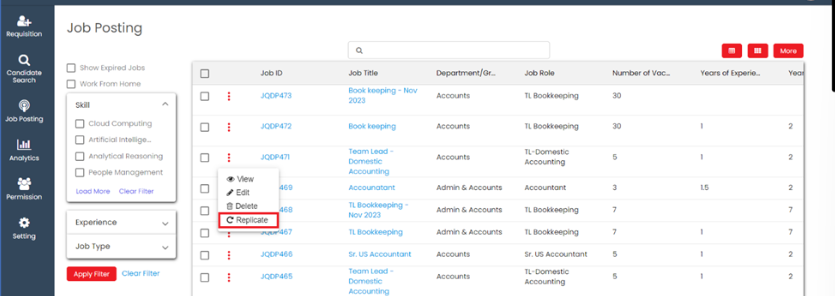
Click on **Replicate** Option.

<figure><img src="https://160083056-files.gitbook.io/~/files/v0/b/gitbook-x-prod.appspot.com/o/spaces%2FmK2RCoJJtarg5gUVoIgX%2Fuploads%2FXfTndzSbx4QEhmtqX4Vr%2Fimage.png?alt=media&#x26;token=39e3499d-7b04-4be4-9e21-c8a4dd0aeb34" alt=""><figcaption></figcaption></figure>

If recruiter click on the 'Replicate' option, a pop-up will appear, and they can view the replicated job post.

<figure><img src="https://160083056-files.gitbook.io/~/files/v0/b/gitbook-x-prod.appspot.com/o/spaces%2FmK2RCoJJtarg5gUVoIgX%2Fuploads%2FRDnQa93wH3aGTMueKwjw%2Fimage.png?alt=media&#x26;token=cd2a97b9-dc64-446e-b69a-c9ec3b49bf83" alt=""><figcaption></figcaption></figure>

If recruiter click on Save button, Job post will replicate.

<figure><img src="https://160083056-files.gitbook.io/~/files/v0/b/gitbook-x-prod.appspot.com/o/spaces%2FmK2RCoJJtarg5gUVoIgX%2Fuploads%2FFGLAyYc5E66kHYbgaNHp%2Fimage.png?alt=media&#x26;token=76a47b3c-3898-49c5-bf41-1f5d3ff4296c" alt=""><figcaption></figcaption></figure>

### Job Post Bulk Edit & Delete <a href="#job-post-bulk-edit-and-delete" id="job-post-bulk-edit-and-delete"></a>

It refers to a feature where multiple job postings can be edited simultaneously or in bulk.

Go to **Job Posting.**

<figure><img src="https://160083056-files.gitbook.io/~/files/v0/b/gitbook-x-prod.appspot.com/o/spaces%2FmK2RCoJJtarg5gUVoIgX%2Fuploads%2FWgtmMUDhcpKQI4B8nCwT%2Fimage.png?alt=media&#x26;token=3c01c6c9-d7e0-4b28-a3a1-c89d34d83e0f" alt=""><figcaption></figcaption></figure>

Click on **List View** Icon.

<figure><img src="https://160083056-files.gitbook.io/~/files/v0/b/gitbook-x-prod.appspot.com/o/spaces%2FmK2RCoJJtarg5gUVoIgX%2Fuploads%2FR62wTxIAq85fNd6CRBQN%2Fimage.png?alt=media&#x26;token=e8b82cfd-c195-4749-a1ba-a6e95f7e3142" alt=""><figcaption></figcaption></figure>

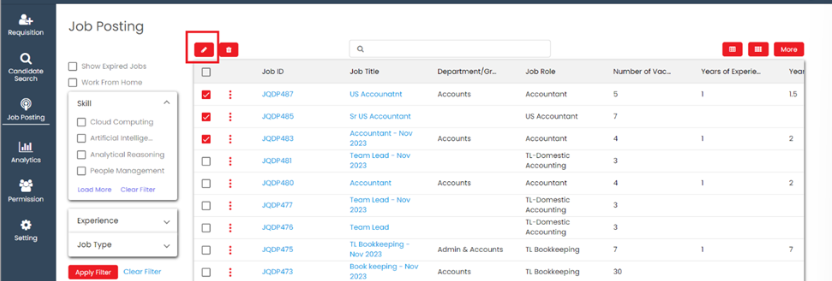
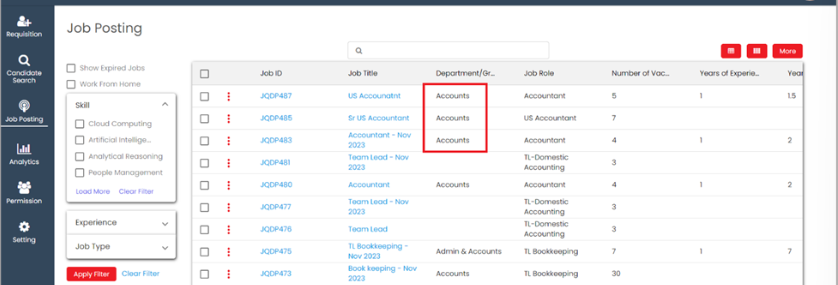
Select multiple job posts which recruiter want to edit or delete at time.

<figure><img src="https://160083056-files.gitbook.io/~/files/v0/b/gitbook-x-prod.appspot.com/o/spaces%2FmK2RCoJJtarg5gUVoIgX%2Fuploads%2FhtO0uJweCh343Bf2Mjnq%2Fimage.png?alt=media&#x26;token=1a59fbd8-2e10-447d-acdf-395dec54544d" alt=""><figcaption></figcaption></figure>

Click on **Edit** option to edit job post.

<figure><img src="https://160083056-files.gitbook.io/~/files/v0/b/gitbook-x-prod.appspot.com/o/spaces%2FmK2RCoJJtarg5gUVoIgX%2Fuploads%2FTw2fFFD4cjRayHSGKfJ1%2Fimage.png?alt=media&#x26;token=2ef79972-15c4-459a-a3df-ab81af28d398" alt=""><figcaption></figcaption></figure>

Select fields which recruiter want to update and click on save.

<figure><img src="https://160083056-files.gitbook.io/~/files/v0/b/gitbook-x-prod.appspot.com/o/spaces%2FmK2RCoJJtarg5gUVoIgX%2Fuploads%2FUVT8HH4NvW7pvgoq1y2k%2Fimage.png?alt=media&#x26;token=4d732c84-868d-413c-90a7-40342e562127" alt=""><figcaption></figcaption></figure>

After click on save job post will be updated.

<figure><img src="https://160083056-files.gitbook.io/~/files/v0/b/gitbook-x-prod.appspot.com/o/spaces%2FmK2RCoJJtarg5gUVoIgX%2Fuploads%2FqAzDDQh9redmub9sQ6D9%2Fimage.png?alt=media&#x26;token=d146bb79-17dd-4143-a132-a419e33c7e1b" alt=""><figcaption></figcaption></figure>

Click on delete icon to delete multiple record.

<figure><img src="https://160083056-files.gitbook.io/~/files/v0/b/gitbook-x-prod.appspot.com/o/spaces%2FmK2RCoJJtarg5gUVoIgX%2Fuploads%2FK0gpEytsFrvtdyQ4OeGv%2Fimage.png?alt=media&#x26;token=81b406e5-13c8-4dac-8c32-f78bcb8c9f0d" alt=""><figcaption></figcaption></figure>

### Details Tab <a href="#details-tab" id="details-tab"></a>

In the details tab, the recruiter can view details of the job post.

Go to job post **Detail** tab.

<figure><img src="https://160083056-files.gitbook.io/~/files/v0/b/gitbook-x-prod.appspot.com/o/spaces%2FmK2RCoJJtarg5gUVoIgX%2Fuploads%2FMVVwdGXG3skXXZqHXtJo%2Fimage.png?alt=media&#x26;token=f6e1b65e-6573-4305-9e54-747a55f77823" alt=""><figcaption></figcaption></figure>

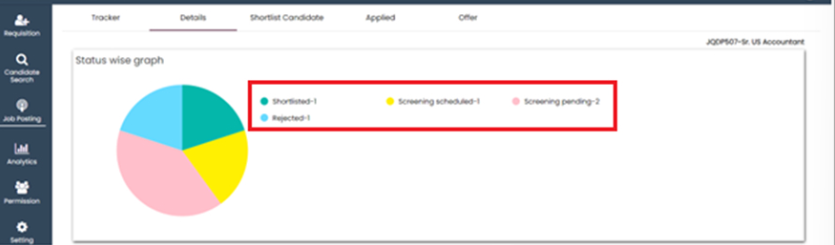
The recruiter can see a graph where they can check how many candidates have which status.

<figure><img src="https://160083056-files.gitbook.io/~/files/v0/b/gitbook-x-prod.appspot.com/o/spaces%2FmK2RCoJJtarg5gUVoIgX%2Fuploads%2F2nUCffohGnIEM17xSj0a%2Fimage.png?alt=media&#x26;token=f0f3a896-0d6c-4470-ad93-fe44bbbca4bc" alt=""><figcaption></figcaption></figure>

### Shortlist Tab <a href="#shortlist-tab" id="shortlist-tab"></a>

In shortlist tab, recruiter can see all candidates available in candidate database.

Go to **Shortlist** tab.

<figure><img src="https://160083056-files.gitbook.io/~/files/v0/b/gitbook-x-prod.appspot.com/o/spaces%2FmK2RCoJJtarg5gUVoIgX%2Fuploads%2F0QbsmvfbQj25eHilYxk5%2Fimage.png?alt=media&#x26;token=8416108d-c206-41ee-8cfd-3664a1a6a532" alt=""><figcaption></figcaption></figure>

The recruiter can check candidates that match the job requirements and shortlist those candidates.

<figure><img src="https://160083056-files.gitbook.io/~/files/v0/b/gitbook-x-prod.appspot.com/o/spaces%2FmK2RCoJJtarg5gUVoIgX%2Fuploads%2FA8KMiEpjHpZK3zJo06SZ%2Fimage.png?alt=media&#x26;token=e22b628c-f10f-4d81-9713-ba6a63a69cf3" alt=""><figcaption></figcaption></figure>

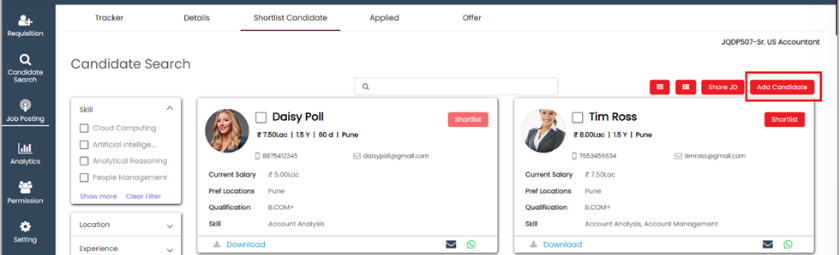
Recruiter can add candidate from shortlist tab.

<figure><img src="https://160083056-files.gitbook.io/~/files/v0/b/gitbook-x-prod.appspot.com/o/spaces%2FmK2RCoJJtarg5gUVoIgX%2Fuploads%2FR7LY1K5I0eQfqyVAIJNR%2Fimage.png?alt=media&#x26;token=685e97f0-c8ca-48cb-a87f-6ecb5ce8119d" alt=""><figcaption></figcaption></figure>

If the recruiter wants to share the job description (JD) with any candidate, they should select the checkbox and click on the 'Share JD' button.

<figure><img src="https://160083056-files.gitbook.io/~/files/v0/b/gitbook-x-prod.appspot.com/o/spaces%2FmK2RCoJJtarg5gUVoIgX%2Fuploads%2FuwEdnoRv0GbpiMB7iTQL%2Fimage.png?alt=media&#x26;token=f723eef4-181b-4206-af32-b9b608239e6a" alt=""><figcaption></figcaption></figure>

### Applied <a href="#applied" id="applied"></a>

Candidates who have applied for the job post from the career portal are shown in the **Applied** tab.

Go to **Applied** tab.

<figure><img src="https://160083056-files.gitbook.io/~/files/v0/b/gitbook-x-prod.appspot.com/o/spaces%2FmK2RCoJJtarg5gUVoIgX%2Fuploads%2F5FVpbf7PBK1hqXrIAW3i%2Fimage.png?alt=media&#x26;token=8d9d457a-bec2-4431-8649-b51f99e64615" alt=""><figcaption></figcaption></figure>

The recruiter can view the candidate's profile and shortlist them for the current job post.

<figure><img src="https://160083056-files.gitbook.io/~/files/v0/b/gitbook-x-prod.appspot.com/o/spaces%2FmK2RCoJJtarg5gUVoIgX%2Fuploads%2F8F2RbNZdkm6zBRvKclAG%2Fimage.png?alt=media&#x26;token=fc5a1310-76f6-45a5-b9be-896a0abe01a5" alt=""><figcaption></figcaption></figure>

### Job Offer <a href="#job-offer" id="job-offer"></a>

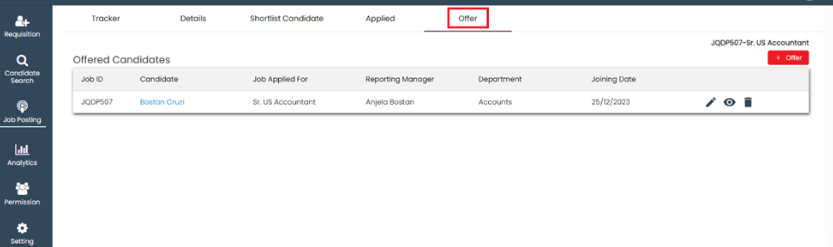
Candidates who have given offers are all shown in the offer tab.

<figure><img src="https://160083056-files.gitbook.io/~/files/v0/b/gitbook-x-prod.appspot.com/o/spaces%2FmK2RCoJJtarg5gUVoIgX%2Fuploads%2FQAaugNLfkDkFPmcm12us%2Fimage.png?alt=media&#x26;token=84fdef15-c70a-47db-9a70-2edff4789d7f" alt=""><figcaption></figcaption></figure>

Recruiter can add job offer for any candidate directly from Offer tab.

<figure><img src="https://160083056-files.gitbook.io/~/files/v0/b/gitbook-x-prod.appspot.com/o/spaces%2FmK2RCoJJtarg5gUVoIgX%2Fuploads%2FcMGlPdhlzUNtZ5u7uJ1n%2Fimage.png?alt=media&#x26;token=b3358f31-5400-44cf-8dfd-02afb20a08f4" alt=""><figcaption></figcaption></figure>

Last updated 17 December 2025