> For the complete documentation index, see [llms.txt](https://docs.aiflo.app/llms.txt). Markdown versions of documentation pages are available by appending `.md` to page URLs; this page is available as [Markdown](https://docs.aiflo.app/meeting-room.md).
# Meeting Room
A meeting room is a space where people come together to discuss ideas, make decisions, or give presentations.
### Meeting Validations and Rule:
Prevent Double Booking:
Rule 1: If a meeting is already scheduled for the same day and time in a particular meeting room, a new meeting cannot be added to that room for that time slot.
Validation Message: "Selected meeting room and time slot are already booked."
Disallow Past Date Bookings:
Rule 2: Meetings cannot be scheduled for any past dates.
Validation Message: "Please select a current or future date."
Disallow Past Time Bookings:
Rule 3: Meetings cannot be scheduled for any past time.
Validation Message: "Please select the current or a future time."
### **How to add the meeting**
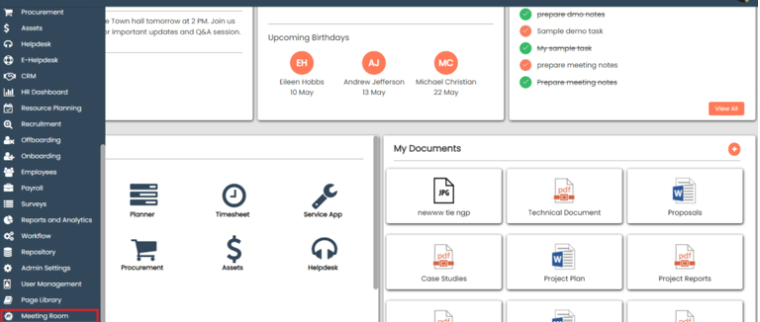
Go to **Meeting Room.**
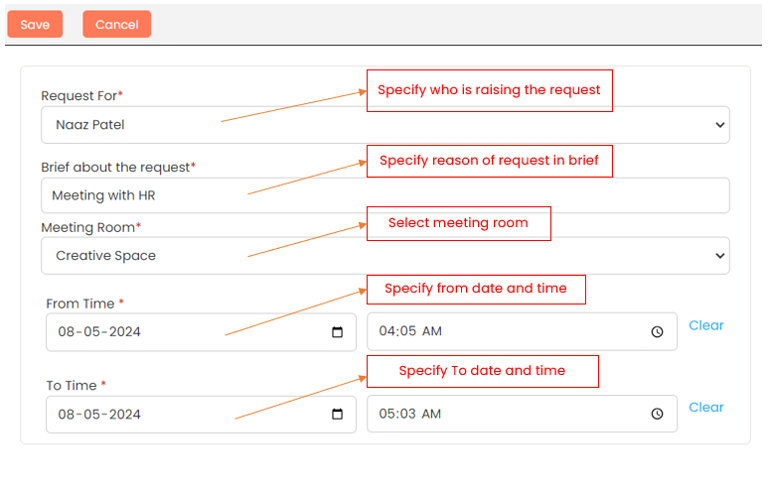
Click **Add** to create a meeting room request.
Fill up all details and click on **Save**.
After save the form, the meeting is displayed in the meeting room for the selected date.
Last Updated 26 December 2025