# Opportunity Activity

### Create Follow-up for The Opportunity <a href="#create-follow-up-for-the-opportunity" id="create-follow-up-for-the-opportunity"></a>

You can include a follow-up for the opportunity you created.

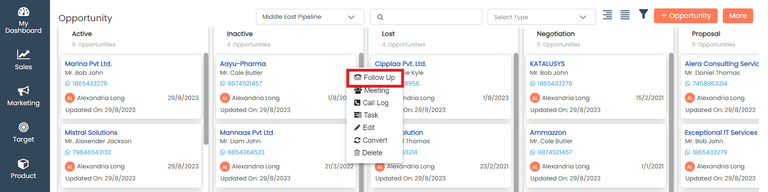
To add follow up

In **Opportunity,** click on the Action menu (3 vertical dots) ![](https://help.quickappflow.com/~gitbook/image?url=https%3A%2F%2F531923687-files.gitbook.io%2F%7E%2Ffiles%2Fv0%2Fb%2Fgitbook-x-prod.appspot.com%2Fo%2Fspaces%252FnhvnNmu6p9CSODwQTjgf%252Fuploads%252FNnEMEFdhWPPnOHFgUDHi%252F0.png%3Falt%3Dmedia\&width=300\&dpr=4\&quality=100\&sign=74fd093e\&sv=2) for the record to which you would like to add follow-up and click the **Follow-Up** button

<figure><img src="https://160083056-files.gitbook.io/~/files/v0/b/gitbook-x-prod.appspot.com/o/spaces%2FmK2RCoJJtarg5gUVoIgX%2Fuploads%2FtlbDmVhPo8muTq7Gw2Sf%2Fimage.avif?alt=media&#x26;token=63bdb10f-9363-4ac4-b292-d6217f39937d" alt=""><figcaption></figcaption></figure>

Enter the details on the follow-up page and **save** the form

<figure><img src="https://160083056-files.gitbook.io/~/files/v0/b/gitbook-x-prod.appspot.com/o/spaces%2FmK2RCoJJtarg5gUVoIgX%2Fuploads%2Fs4dglcHiCQA2GexYZdJt%2Fimage.avif?alt=media&#x26;token=793becf0-6f1a-4984-bc21-9b031d399c18" alt=""><figcaption></figcaption></figure>

### Create a Meeting for The Opportunity <a href="#create-a-meeting-for-the-opportunity" id="create-a-meeting-for-the-opportunity"></a>

You can add a **Meeting** for which you created an opportunity.

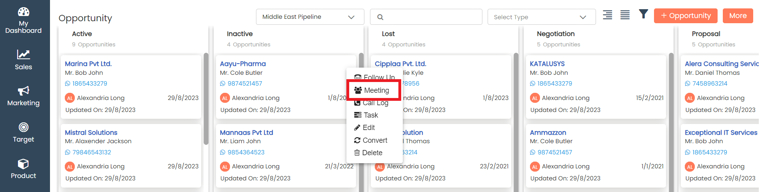
To add Meeting

In **Opportunity,** click on the Action menu (3 vertical dots) ![](https://help.quickappflow.com/~gitbook/image?url=https%3A%2F%2F531923687-files.gitbook.io%2F%7E%2Ffiles%2Fv0%2Fb%2Fgitbook-x-prod.appspot.com%2Fo%2Fspaces%252FnhvnNmu6p9CSODwQTjgf%252Fuploads%252FFRAh8gIV12FkyL86D1ZB%252F3.png%3Falt%3Dmedia\&width=300\&dpr=4\&quality=100\&sign=45eafa6a\&sv=2) for the record to which you would like to add a meeting and click the **Meeting** button

<figure><img src="https://160083056-files.gitbook.io/~/files/v0/b/gitbook-x-prod.appspot.com/o/spaces%2FmK2RCoJJtarg5gUVoIgX%2Fuploads%2FhVSpUkPQ0zqmZzi4Jg8q%2Fimage.avif?alt=media&#x26;token=a02d48c3-761b-40e2-82b6-03711b9684bb" alt=""><figcaption></figcaption></figure>

Enter the details on the meeting page and **save** the form

<figure><img src="https://160083056-files.gitbook.io/~/files/v0/b/gitbook-x-prod.appspot.com/o/spaces%2FmK2RCoJJtarg5gUVoIgX%2Fuploads%2FE6zmDPXFiyCDfJpLCRrr%2Fimage.avif?alt=media&#x26;token=46098f3a-5638-4cc0-a032-d6be036e2c4f" alt=""><figcaption></figcaption></figure>

### Create a Call log For the Opportunity <a href="#create-a-call-log-for-the-opportunity" id="create-a-call-log-for-the-opportunity"></a>

You can add a **Call Log** for that you created an opportunity.

To add a Call Log

In **Opportunity,** click on the Action menu (3 vertical dots) ![](https://help.quickappflow.com/~gitbook/image?url=https%3A%2F%2F531923687-files.gitbook.io%2F%7E%2Ffiles%2Fv0%2Fb%2Fgitbook-x-prod.appspot.com%2Fo%2Fspaces%252FnhvnNmu6p9CSODwQTjgf%252Fuploads%252FmyOEqHXZWrLed74Fey15%252F6.png%3Falt%3Dmedia\&width=300\&dpr=4\&quality=100\&sign=ced7f276\&sv=2) for the record to which you would like to add call log and click the **call log** button

<figure><img src="https://160083056-files.gitbook.io/~/files/v0/b/gitbook-x-prod.appspot.com/o/spaces%2FmK2RCoJJtarg5gUVoIgX%2Fuploads%2Frg7jvcXoUnAibvvq6siB%2Fimage.avif?alt=media&#x26;token=7fcd38ab-5fb7-4c5d-8497-5c8f8a0f812b" alt=""><figcaption></figcaption></figure>

Enter the details in the call log page and **save** the form

<figure><img src="https://160083056-files.gitbook.io/~/files/v0/b/gitbook-x-prod.appspot.com/o/spaces%2FmK2RCoJJtarg5gUVoIgX%2Fuploads%2F70Xfyl5BgleXsGZ2pri1%2Fimage.avif?alt=media&#x26;token=d1626e8a-0103-493b-ade3-bbac7c3c21a3" alt=""><figcaption></figcaption></figure>

### Create a Task for The Opportunity <a href="#create-a-task-for-the-opportunity" id="create-a-task-for-the-opportunity"></a>

You can add a **Task** for which you created an opportunity.

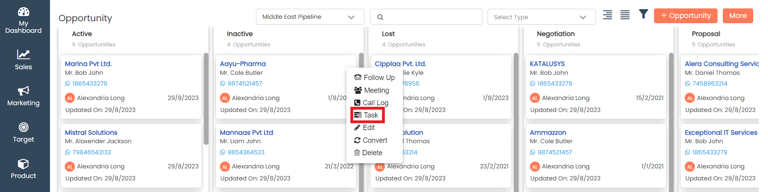
To add task

In **Opportunity** click on the Action menu (3 vertical dots) ![](https://help.quickappflow.com/~gitbook/image?url=https%3A%2F%2F531923687-files.gitbook.io%2F%7E%2Ffiles%2Fv0%2Fb%2Fgitbook-x-prod.appspot.com%2Fo%2Fspaces%252FnhvnNmu6p9CSODwQTjgf%252Fuploads%252FMTBcIwdHUWUoTUysHnMa%252F9.png%3Falt%3Dmedia\&width=300\&dpr=4\&quality=100\&sign=54e51772\&sv=2) for the record to which you would like to add a task and click the **Task** button

<figure><img src="https://160083056-files.gitbook.io/~/files/v0/b/gitbook-x-prod.appspot.com/o/spaces%2FmK2RCoJJtarg5gUVoIgX%2Fuploads%2FvaJBw2I28Gdxl9M1EcMa%2Fimage.avif?alt=media&#x26;token=26997efb-4c40-4000-b5d0-c9bc201af0aa" alt=""><figcaption></figcaption></figure>

Enter the details on the task page and **save** the form

<figure><img src="https://160083056-files.gitbook.io/~/files/v0/b/gitbook-x-prod.appspot.com/o/spaces%2FmK2RCoJJtarg5gUVoIgX%2Fuploads%2FvthM1XcRgM3BVQKcLSv0%2Fimage.avif?alt=media&#x26;token=4ed453fa-7bbb-4379-a04e-70f470b323fc" alt=""><figcaption></figcaption></figure>

### Edit Opportunity <a href="#edit-opportunity" id="edit-opportunity"></a>

You can choose to edit the opportunity that you have created.

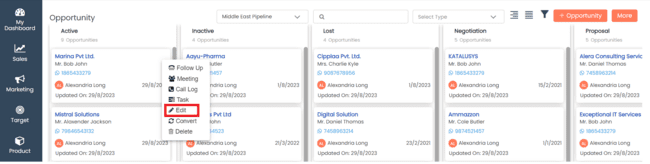
To edit Opportunity

In **Opportunity** click on the Action menu (3 vertical dots) ![](https://help.quickappflow.com/~gitbook/image?url=https%3A%2F%2F531923687-files.gitbook.io%2F%7E%2Ffiles%2Fv0%2Fb%2Fgitbook-x-prod.appspot.com%2Fo%2Fspaces%252FnhvnNmu6p9CSODwQTjgf%252Fuploads%252FW6V9flBU4sTx7Cc8o7Yt%252F12.png%3Falt%3Dmedia\&width=300\&dpr=4\&quality=100\&sign=b70fc5b5\&sv=2) for the record that you would like to edit and click the **Edit** button

<figure><img src="https://160083056-files.gitbook.io/~/files/v0/b/gitbook-x-prod.appspot.com/o/spaces%2FmK2RCoJJtarg5gUVoIgX%2Fuploads%2FfMZV4Ap74dWG5zpOYWzb%2Fimage.png?alt=media&#x26;token=0c32c22c-8799-400d-a265-5adc18a8c8e8" alt=""><figcaption></figcaption></figure>

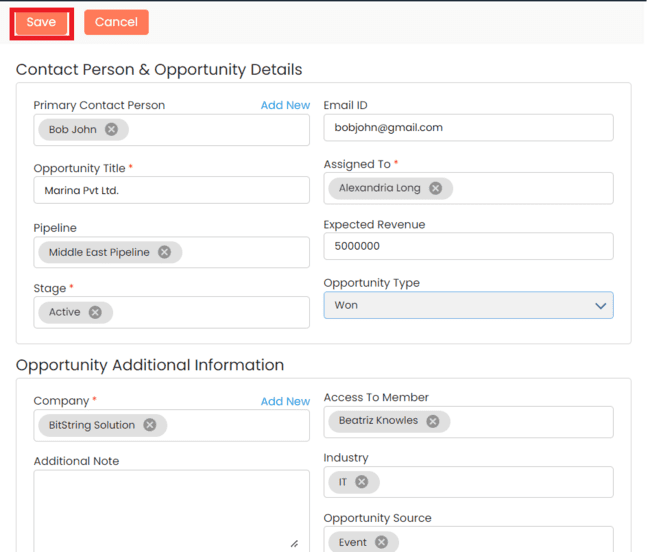
Make the necessary changes and click on **Save**

<figure><img src="https://160083056-files.gitbook.io/~/files/v0/b/gitbook-x-prod.appspot.com/o/spaces%2FmK2RCoJJtarg5gUVoIgX%2Fuploads%2F94vLGF1ILHLaJfT2SpD9%2Fimage.png?alt=media&#x26;token=446e39a7-c0ea-401b-89b3-0536492f41d0" alt=""><figcaption></figcaption></figure>

### Convert Opportunity <a href="#convert-opportunity" id="convert-opportunity"></a>

You can convert the opportunity in the view page

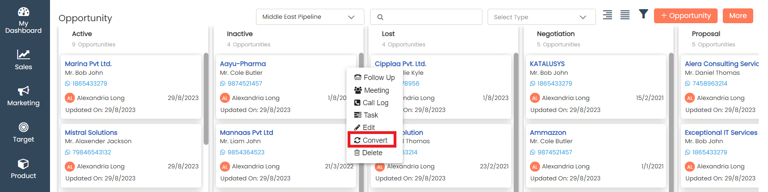
To convert opportunity

In **Opportunity**, click on the Action menu (3 vertical dots) ![](https://help.quickappflow.com/~gitbook/image?url=https%3A%2F%2F531923687-files.gitbook.io%2F%7E%2Ffiles%2Fv0%2Fb%2Fgitbook-x-prod.appspot.com%2Fo%2Fspaces%252FnhvnNmu6p9CSODwQTjgf%252Fuploads%252FzT2xVHe4Uzb20kCds4Ab%252F15.png%3Falt%3Dmedia\&width=300\&dpr=4\&quality=100\&sign=d09e2cc4\&sv=2) for the record that you would like to convert and click the **convert** button

<figure><img src="https://160083056-files.gitbook.io/~/files/v0/b/gitbook-x-prod.appspot.com/o/spaces%2FmK2RCoJJtarg5gUVoIgX%2Fuploads%2FY7q9VxeaoVWpCHiwouXw%2Fimage.avif?alt=media&#x26;token=35e98011-638b-4b9f-873e-80af83f26dc8" alt=""><figcaption></figcaption></figure>

You need to select that convert opportunity as New Customer or Existing Customer, move **this opportunity to stage,** and click on the **convert** button

<figure><img src="https://160083056-files.gitbook.io/~/files/v0/b/gitbook-x-prod.appspot.com/o/spaces%2FmK2RCoJJtarg5gUVoIgX%2Fuploads%2FHd8ABMgiTcJ3dB7hkOkd%2Fimage.avif?alt=media&#x26;token=9af4aa8b-94c0-4e31-9178-8d2eb9df938a" alt=""><figcaption></figcaption></figure>

### Delete Opportunity <a href="#delete-opportunity" id="delete-opportunity"></a>

Opportunity once added can be deleted if no longer necessary

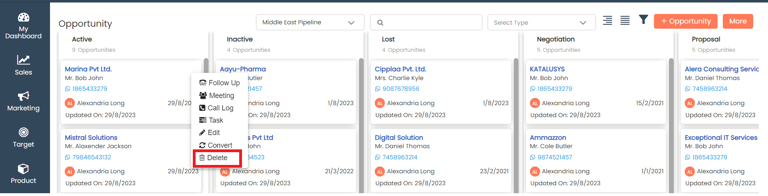
To delete Opportunity

In **Opportunity**, click on the Action menu (3 vertical dots) ![](https://help.quickappflow.com/~gitbook/image?url=https%3A%2F%2F531923687-files.gitbook.io%2F%7E%2Ffiles%2Fv0%2Fb%2Fgitbook-x-prod.appspot.com%2Fo%2Fspaces%252FnhvnNmu6p9CSODwQTjgf%252Fuploads%252FUhYCFHMBFgBmUAkDF3r5%252F18.png%3Falt%3Dmedia\&width=300\&dpr=4\&quality=100\&sign=2a76d3a2\&sv=2) for the record that you would like to delete and click the **Delete** button

<figure><img src="https://160083056-files.gitbook.io/~/files/v0/b/gitbook-x-prod.appspot.com/o/spaces%2FmK2RCoJJtarg5gUVoIgX%2Fuploads%2FJjWTVKBy8AA13xJfnDDt%2Fimage.avif?alt=media&#x26;token=2fbe43e9-fb22-4ce3-9c7c-bc7f5d46b843" alt=""><figcaption></figcaption></figure>

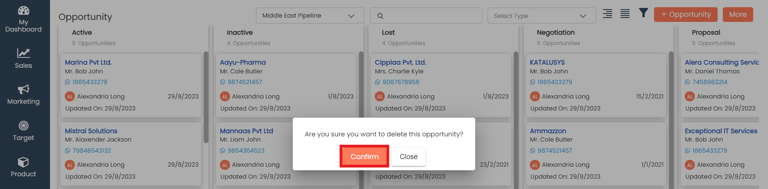
Give your confirmation in the popup and the record will be deleted

<figure><img src="https://160083056-files.gitbook.io/~/files/v0/b/gitbook-x-prod.appspot.com/o/spaces%2FmK2RCoJJtarg5gUVoIgX%2Fuploads%2FSQXyhlX8RQfMz1m2J4mq%2Fimage.avif?alt=media&#x26;token=32c2b022-afae-4871-9339-6c9bd83599f4" alt=""><figcaption></figcaption></figure>

Last updated 11 December 2025