> For the complete documentation index, see [llms.txt](https://docs.aiflo.app/llms.txt). Markdown versions of documentation pages are available by appending `.md` to page URLs; this page is available as [Markdown](https://docs.aiflo.app/offboarding/configure-offboarding-task.md).
# Configure Offboarding Task
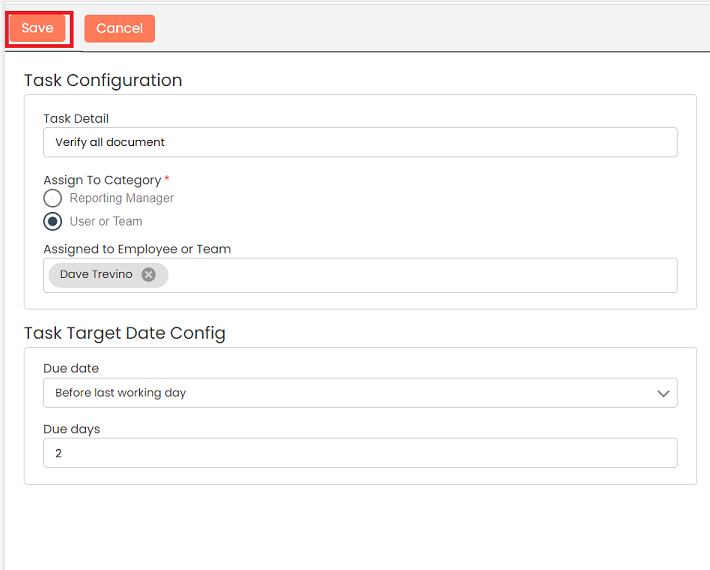
You can create offboarding task and assign that task to individual or any team. You can assign due date on joining date, before joining date or after joining date
### Add Offboarding Task
Go to **Task Config**
Click on **+Task** button to add new task
Enter all details of task and click o **Save** button
A **New task** added at the top
### Edit Offboarding Task
You can choose to edit the offboarding task that you have created.
To edit offboarding task
Click on the Action (3 vertical dots)  for the record which you would like to edit and click the **Edit** button
Make the necessary changes and click **Save**
### Delete Offboarding Task
Offboarding Task once added can be deleted if no longer necessary
To delete offboarding task
Click on the Action menu (3 vertical dots)  for the record which you would like to delete and click the **Delete** button
Give your confirmation in the popup and the record will be deleted
### View Offboarding Task
You can choose to view the offboarding task that you have created.
To view offboarding task
Click on the Action menu (3 vertical dots)  for the record which you would like to view and click the **View** button
You can see all details of offboarding task
Last updated 24 December 2025