# Product

### Add and Manage Product <a href="#add-and-manage-product" id="add-and-manage-product"></a>

To Create Product

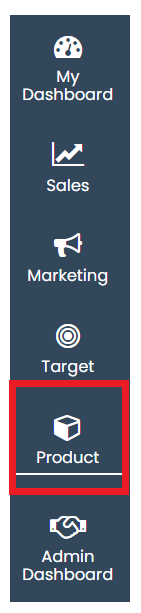
Go to left **Navigation and click on Product**

<figure><img src="https://160083056-files.gitbook.io/~/files/v0/b/gitbook-x-prod.appspot.com/o/spaces%2FmK2RCoJJtarg5gUVoIgX%2Fuploads%2FPkVJx4zDw1MAnLIpcrkR%2Fimage.png?alt=media&#x26;token=77cb7123-d7c6-4100-9379-5cdc66b0c723" alt=""><figcaption></figcaption></figure>

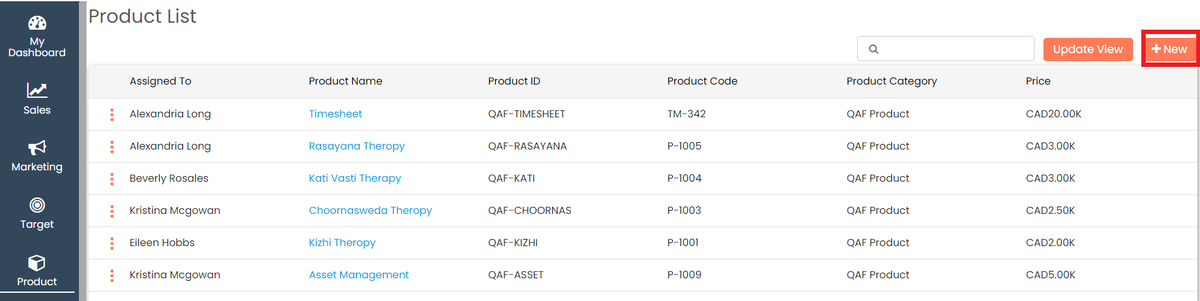
Click on **+New** to add a new product

<figure><img src="https://160083056-files.gitbook.io/~/files/v0/b/gitbook-x-prod.appspot.com/o/spaces%2FmK2RCoJJtarg5gUVoIgX%2Fuploads%2Ff0zDoFdXoaiyYmDuQzTk%2Fimage.avif?alt=media&#x26;token=2570fc34-17c1-43d6-b14a-a31c8aa6edf7" alt=""><figcaption></figcaption></figure>

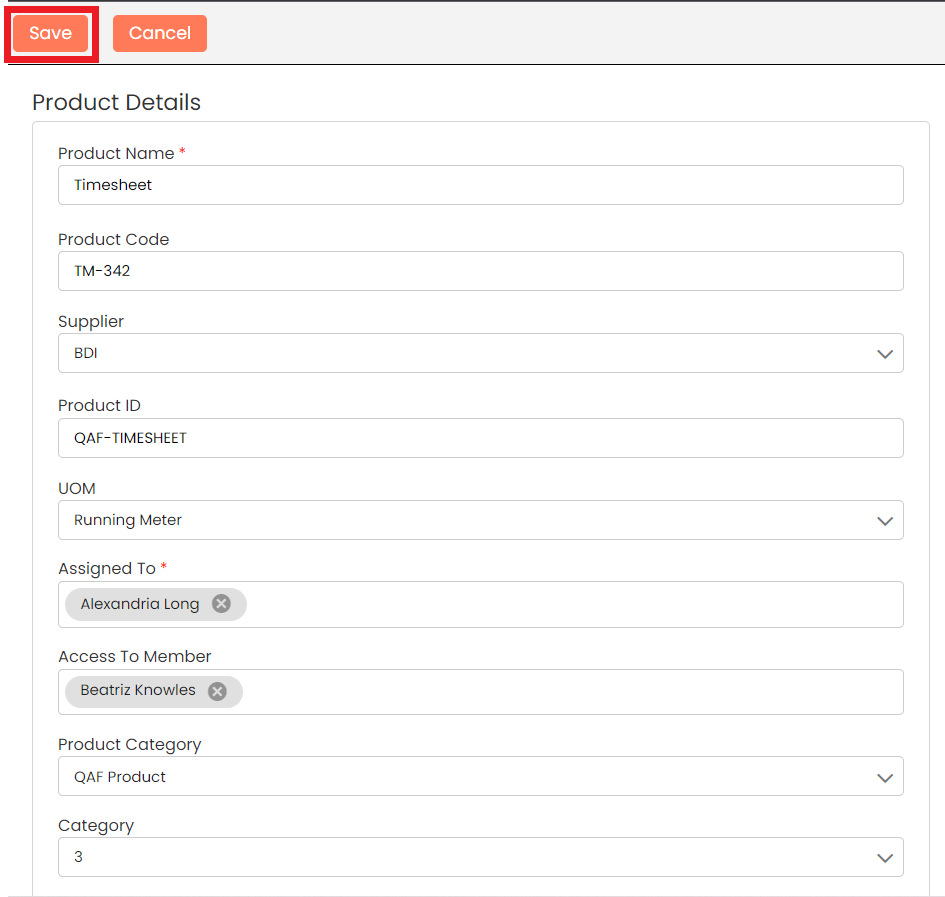
Add all the Details and **Save**

<figure><img src="https://160083056-files.gitbook.io/~/files/v0/b/gitbook-x-prod.appspot.com/o/spaces%2FmK2RCoJJtarg5gUVoIgX%2Fuploads%2FONLtkMSzu5KWXfKtJRVX%2Fimage.png?alt=media&#x26;token=d38ec5cc-24e1-4af5-8b39-cedd52a7ea2e" alt=""><figcaption></figcaption></figure>

Check the newly added **Product** shown top of the list

<figure><img src="https://160083056-files.gitbook.io/~/files/v0/b/gitbook-x-prod.appspot.com/o/spaces%2FmK2RCoJJtarg5gUVoIgX%2Fuploads%2FEUcfq3Pw9GCSvLrRdPfl%2Fimage.avif?alt=media&#x26;token=184d5948-1477-4d0a-badb-ed0ff5e8d2bf" alt=""><figcaption></figcaption></figure>

### Edit Product <a href="#edit-product" id="edit-product"></a>

You can choose to edit the product that you have created.

Click on the Action menu (3 vertical dots) ![](https://help.quickappflow.com/~gitbook/image?url=https%3A%2F%2F531923687-files.gitbook.io%2F%7E%2Ffiles%2Fv0%2Fb%2Fgitbook-x-prod.appspot.com%2Fo%2Fspaces%252FnhvnNmu6p9CSODwQTjgf%252Fuploads%252FIwuM2kLuaNwtR0qnSh4x%252F4.png%3Falt%3Dmedia\&width=300\&dpr=4\&quality=100\&sign=2501c0e0\&sv=2) for the record that you would like to edit and click the **Edit** button

<figure><img src="https://160083056-files.gitbook.io/~/files/v0/b/gitbook-x-prod.appspot.com/o/spaces%2FmK2RCoJJtarg5gUVoIgX%2Fuploads%2FJPS38H5CWVevcWL3POZr%2Fimage.avif?alt=media&#x26;token=bd9864d2-84db-42cf-89b6-3f27530c82b2" alt=""><figcaption></figcaption></figure>

Make the necessary changes and click on **Save**

<figure><img src="https://160083056-files.gitbook.io/~/files/v0/b/gitbook-x-prod.appspot.com/o/spaces%2FmK2RCoJJtarg5gUVoIgX%2Fuploads%2Fpb5chpgBSQZrvE7cAiK0%2Fimage.png?alt=media&#x26;token=57028fca-27df-4b29-84eb-c187eb9c90c7" alt=""><figcaption></figcaption></figure>

### Delete Product <a href="#delete-product" id="delete-product"></a>

You can choose to delete the product that you have created.

Click on the Action menu (3 vertical dots) ![](https://help.quickappflow.com/~gitbook/image?url=https%3A%2F%2F531923687-files.gitbook.io%2F%7E%2Ffiles%2Fv0%2Fb%2Fgitbook-x-prod.appspot.com%2Fo%2Fspaces%252FnhvnNmu6p9CSODwQTjgf%252Fuploads%252FZNc1CnzYCTRTO2d0LFD9%252F7.png%3Falt%3Dmedia\&width=300\&dpr=4\&quality=100\&sign=5988547c\&sv=2) for the record that you would like to delete and click the **Delete** button

<figure><img src="https://160083056-files.gitbook.io/~/files/v0/b/gitbook-x-prod.appspot.com/o/spaces%2FmK2RCoJJtarg5gUVoIgX%2Fuploads%2FWCZ6ZwrHnpEJqWtk732B%2Fimage.avif?alt=media&#x26;token=959585eb-2898-424e-8e49-b2bd52ee7c2a" alt=""><figcaption></figcaption></figure>

Give the **Confirmation** in the popup and the record will be deleted

<figure><img src="https://160083056-files.gitbook.io/~/files/v0/b/gitbook-x-prod.appspot.com/o/spaces%2FmK2RCoJJtarg5gUVoIgX%2Fuploads%2FVF8iect7jDbKpTYcS3bu%2Fimage.avif?alt=media&#x26;token=c334ac67-8183-4833-9f78-0f2fdd4896c0" alt=""><figcaption></figcaption></figure>

Last updated 15 December 2025